


Univision Noticias
4.74.87K Reviews
App Specs
- Version
- 20.0.1
- Updated On
- License
- Free
- Downloads
- 1,000,000+
- Developer
- Univision Communications Inc.
- Categories
- News & Magazines
- Platform
- Android, iOS
Screenshots
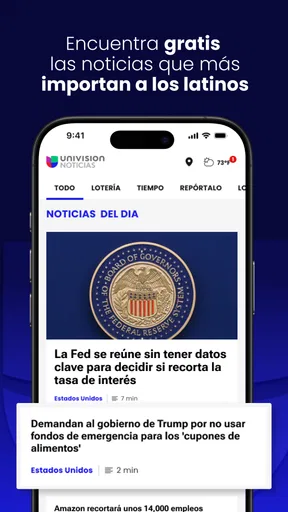


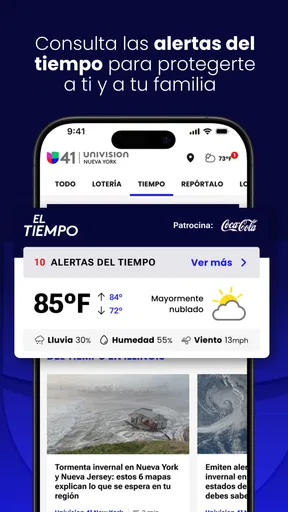


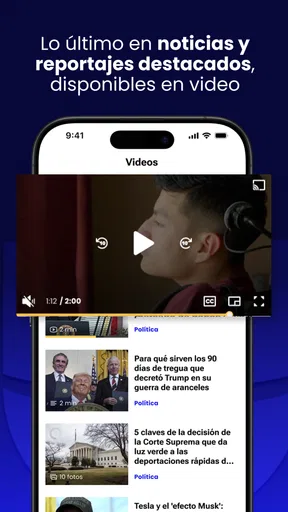

 Analysis by AppCompare
I use news apps differently from social networks: I want a quick way to understand what is happening, but I also want enough context to decide whether a story deserves more of my attention. Univision Noticias fits that habit well if you mainly follow news in Spanish, especially stories connected to the United States, politics, immigration, the economy, health, and international events. It is a free news and magazines app from Univision Communications Inc., with a Teen content rating and support beginning with OS 8.1.
My overall impression is of a focused companion rather than an all-purpose newsstand. It puts Univision’s editorial world in one place, which makes it convenient for readers who already recognize the network and prefer Spanish-language coverage. At the same time, that focus is also its main limitation: people looking for a broad mix of independent publishers, highly specialized reporting, or a completely neutral cross-source dashboard may prefer an aggregator or several individual newspaper apps.
How the app feels during everyday reading
The first useful distinction is between opening the app for a quick check and using it as a primary source throughout a busy day. For a quick check, the subject range is practical. I can move from a national political development to immigration, then to health or world news without changing apps. That reduces the small bits of friction that often make people abandon a news routine.
I would not describe the experience as a replacement for every other source. Univision Noticias is strongest when I want a Spanish-language view shaped around issues that affect Hispanic audiences in the United States. If I am researching a complicated policy, comparing competing interpretations, or following a very local event outside that editorial focus, I would still consult another publication. The app works best as a dependable starting point, not as my only window onto the world.
The store summary presents coverage of U.S. news, politics, immigration, the economy, health, the world, and more. In practical terms, that breadth gives the app a sensible daily rhythm. There is enough variety for a morning scan, but the experience remains more coherent than a feed assembled from dozens of unrelated sources. I appreciate that balance because it helps me keep up without turning every visit into an endless browsing session.
Speed expectations when I only have a minute
News apps earn their place on a phone by making the first visit easy. Univision Noticias feels designed around that short session: open it, identify the main topics, choose a story, and decide whether to continue reading. I find that workflow more useful than an app that immediately overwhelms me with every possible section.
Perceived speed depends on more than the app itself. The network connection, the age of the phone, and how much content is being loaded all affect the moment-to-moment experience. I would therefore avoid promising a fixed loading time. What I can say is that the app’s focused purpose makes it feel less mentally demanding than a general news aggregator, even when I am only checking one headline.
Worth Reading Before You Choose

EA SPORTS FC Mobile 26 Is a Bigger Football Game, but It Takes Time

Flipboard Shows What News Apps Must Do Beyond the Feed

Switching to Android Auto Means Rethinking Your Driving Routine

Google Calendar Makes a Crowded Week Easier to Manage

Ludo King Makes the Most of the Minutes Between Plans

Baby Panda World Brings Quick Play to Modern Phones, but Its Game Library Feels Busy
One small habit improves the experience: I open the app with a question in mind instead of scrolling without a goal. For example, if I want to understand an immigration development, I look for that topic first and read the relevant article before moving elsewhere. This turns the app from a stream of distractions into a practical briefing tool.
The current version is 20.0.1, so users should keep the app updated through the normal store process when an update is available. I do not treat a version number as a guarantee of speed or stability, but it does matter when deciding whether an older phone is likely to provide the smoothest experience. The minimum operating-system requirement is 8.1, which keeps the app accessible to many older devices while still leaving performance dependent on the hardware itself.
What happens during heavier reading sessions
A short headline check is easy to judge, but a longer session reveals more about whether a news app fits your routine. If I move through several sections, open multiple articles, and return to the main news view, the important question is not simply whether the app launches. It is whether the reading flow remains comfortable and whether I can find my way back without losing track of what I was doing.
Univision Noticias makes the most sense for readers who prefer several brief visits rather than one long research session. I can use it while having breakfast, revisit it during a commute break, and check it again in the evening. That pattern also reduces the pressure on an older phone because I am not asking it to hold a large reading session open indefinitely.
For heavier use, I recommend closing articles I have finished instead of leaving many screens open. This is not a special feature claim; it is simply a sensible phone habit that keeps navigation clearer and makes recovery easier if the operating system removes an inactive app from memory. Readers who regularly jump among many sources may find this approach less convenient than using a browser with several tabs or a dedicated aggregator.
Another trade-off appears when a major story develops quickly. A focused publisher app can be easier to follow because the coverage is presented within one editorial environment. However, that same focus means I may want a second source for confirmation or a different angle. I see this as a reason to combine the app with good reading judgment, not as a defect unique to Univision Noticias.
Resource demands are difficult to separate from the device and connection being used. A newer phone should have an easier time moving through a modern news app than an older entry-level model, especially when several stories are opened in succession. On a modest device, I would keep sessions shorter, avoid leaving many apps active, and give the app a fresh start if navigation begins to feel sluggish.
Reliability and recovering from interruptions
Reliability matters more to me in a news app than visual polish. If I open it during a developing story, I need a reasonable path back to the content after a phone call, a weak connection, or an accidental exit. The app is useful in that role because its purpose is straightforward: return to the news, select the topic, and continue reading.
Still, no app should be judged as if a network connection were guaranteed. Articles and current coverage depend on connectivity, and a poor signal can make any news service feel slow or incomplete. When I know I will be moving between areas with unreliable service, I avoid treating the app as my sole source of information. I check important stories when I have a stable connection and do not assume that a previously visible headline means every related article will remain immediately available offline.
My recovery advice is simple. If a story does not open properly, I first return to the main view and try again rather than repeatedly tapping the same control. If the app appears stuck, I close it and relaunch it. On an older phone, restarting the device can also help when several other apps have been competing for memory. These are ordinary steps, but they matter because a good recovery path is more valuable than a promise of perfect behavior.
The app’s long presence in the category is reassuring to me. It was released on December 22, 2011, and it has grown into a widely used option rather than a new experiment. Its average rating is 4.7 from around 18 thousand ratings, with roughly 4.9 thousand written reviews, and it has passed one million installs. Those figures suggest strong adoption and user satisfaction, although they cannot tell me whether every reader will agree with the editorial focus or have the same experience on every phone.
Device limits and who should think twice
Because the app supports OS 8.1 and newer, it is not restricted to recent phones. That is good news for anyone who wants to keep using an older device for reading. However, operating-system compatibility is only the entry point. A phone with limited memory, a crowded storage space, or an aging battery may still feel less responsive during repeated article loading and switching.
If I were installing it on an older device, I would first make sure the system has room for normal updates and that other background apps are not constantly active. I would also avoid judging the app after a single slow launch on a weak connection. A better test is to use it across several ordinary moments: one quick opening, one longer reading session, and one return after an interruption. That gives a more realistic picture of whether the phone or the app is causing the friction.
The Teen rating is worth noting for families. It signals that this is news content rather than a child-focused reading environment. Current events can include difficult subjects, political conflict, health concerns, immigration issues, or other material that parents may want to discuss with younger readers. I would not hand the app to a child expecting the simplified controls or carefully filtered subject matter of a children’s product.
Privacy-conscious readers may also want to think about their normal news habits before making it a central app. I am not assigning permissions or policies that are not stated here, but I do recommend checking the app’s current store details and device prompts during installation. That is especially sensible for anyone who is careful about notifications, background activity, or how frequently a news app is allowed to interrupt the day.
Where it beats alternatives, and where it does not
Compared with reading Univision coverage only through a mobile browser, the dedicated app offers a more direct routine. I do not have to begin with a general search every time I want to check the publisher’s current news. That convenience is most noticeable for people who already know they want Spanish-language coverage from Univision and do not need to compare a dozen outlets before choosing a story.
Compared with a broad news aggregator, the app feels more consistent but less diverse. An aggregator is better when I want several editorial perspectives, local publications, technology reporting, sports, business analysis, and international sources gathered together. Univision Noticias is better when I value a clear Spanish-language destination with strong attention to U.S. issues relevant to Hispanic readers.
Compared with installing separate apps from newspapers, broadcasters, and specialist publications, this option is simpler to maintain. I can keep one focused news destination instead of managing a collection of apps that each compete for attention. The cost of that simplicity is breadth: a reader who wants deep specialization or extensive source comparison will probably build a wider toolkit.
I also would not choose it as my only tool for professional research. For work that requires tracing an event across original documents, multiple regions, or competing editorial positions, I need more than one publication. The app is valuable for staying oriented and finding stories worth investigating, but orientation and verification are different jobs.
Practical routines that make the app more useful
My favorite use case is a short morning briefing. I open the app, scan the major subjects, read one or two articles that affect my day, and stop before the feed becomes a time sink. This works particularly well for someone who wants to follow U.S. politics or immigration without spending the morning switching among social media posts, search results, and unrelated headlines.
A second useful routine is to use topic changes deliberately. I might read an economy story, then check health coverage, and finally look at world news. Moving between subjects helps me avoid mistaking one busy category for the whole news cycle. It also makes the app’s broad coverage more valuable than simply opening the first headline repeatedly.
A third tip is to separate discovery from confirmation. I use the app to discover what deserves attention, then seek another reputable source when a claim could affect a personal decision, a workplace conversation, or an important family discussion. This is a healthier workflow than treating one app, even a familiar publisher, as an automatic substitute for judgment.
For commuters and people with unpredictable schedules, the app is most useful when treated as a series of small visits. I do not rely on an uninterrupted session. If a call or message pulls me away, I return through the main news view and locate the story again. That approach is less frustrating than expecting every interruption to preserve a perfect reading position.
My performance verdict
After weighing speed expectations, heavier reading, recovery, and device constraints, I see Univision Noticias as a practical, focused news app rather than a universal news solution. Its strongest advantage is the combination of Spanish-language access and coverage that centers on U.S. news, politics, immigration, the economy, health, and world events. The free price also makes it easy to try without committing to a subscription.
The best reason to install it is clarity of purpose: it gives Spanish-speaking readers a direct daily route into Univision’s news coverage. I would recommend it to readers who want a familiar publisher on their phone, prefer short and repeatable news checks, and understand that one editorial source cannot provide every perspective.
I would skip it if my priority is a multi-publisher feed, highly specialized reporting, or a research workflow that requires extensive comparison. I would also be cautious on an older, heavily loaded phone until I had tested how it handles repeated openings and longer reading sessions. The OS requirement is approachable, but compatibility alone does not guarantee a smooth experience on aging hardware.
For my own use, the app earns a place as a dependable first stop. I would keep it alongside another source for major or disputed stories, not because it lacks value, but because responsible news reading benefits from context. With that expectation, Univision Noticias is an easy recommendation for Spanish-language readers who want a focused, accessible way to keep up with the issues most likely to shape everyday life.
Pros
- Live news updates keep you informed about major U.S. and Latin American events.
- Spanish-language coverage is useful for bilingual and Spanish-speaking audiences.
- Includes videos
- interviews
- and reports beyond written news stories.
- Breaking-news alerts can deliver important updates quickly.
- News sections make it easy to browse politics
- sports
- weather
- and entertainment.
Cons
- Some content may require a stable internet connection for smooth video playback.
- Frequent notifications can feel excessive unless alert settings are adjusted.
- Advertising may interrupt browsing or appear alongside news content.
- Coverage can focus heavily on U.S. and Latin American topics.
- Video and live-stream availability may vary by location or event rights.
FAQs for Univision Noticias
What is Univision Noticias?
Univision Noticias is a Spanish-language news app from Univision that brings together breaking news, local and international coverage, politics, immigration, business, health, entertainment, and sports. After exploring the app, I found that its main focus is delivering timely articles, videos, and live or on-demand news content for users who prefer receiving information in Spanish on their Android or iOS device.
What type of content can I find in the Univision Noticias app?
The app offers a broad selection of news categories, including major headlines from the United States, Latin America, and around the world. Depending on your location and current events, you may also find local reporting, weather information, investigative stories, opinion pieces, video reports, and updates about immigration, elections, public safety, and community issues. Content availability can change over time.
Is Univision Noticias free to download and use?
Univision Noticias is generally free to download, and many articles, videos, and news updates can be accessed without paying a subscription. However, some features may depend on your location, television provider, or access to certain Univision content. The app may also include advertising, so users should review the current terms, privacy policy, and any optional account or service requirements before using it regularly.
Does Univision Noticias provide breaking news notifications?
Yes, Univision Noticias can provide alerts about breaking stories, important developments, and other selected news topics. During testing, notifications were useful for staying informed without constantly opening the app, although the number of alerts may feel excessive if every category is enabled. You can usually manage notification permissions through the app settings or your device’s system settings.
Is Univision Noticias available for both Android and iPhone?
Yes, Univision Noticias is designed for mobile users and is generally available through the official Google Play Store for Android devices and the Apple App Store for iPhone and iPad. Before downloading, check the store listing for supported operating-system versions, app size, recent updates, and regional availability. Some content or features may differ depending on your country and device.


